


Dr.Oracle AI Medical Assistant
4.122.00 Reviews
App Specs
- Version
- 2.0.4
- Updated On
- License
- Free
- Downloads
- 50,000+
- Developer
- TheDeep
- Categories
- Medical
- Platform
- Android
Screenshots
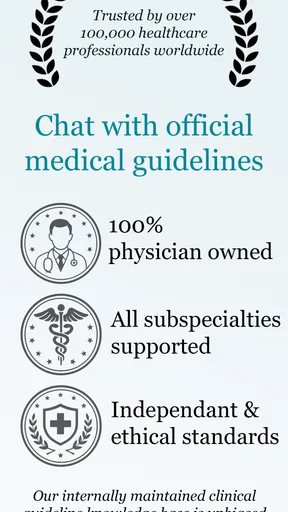
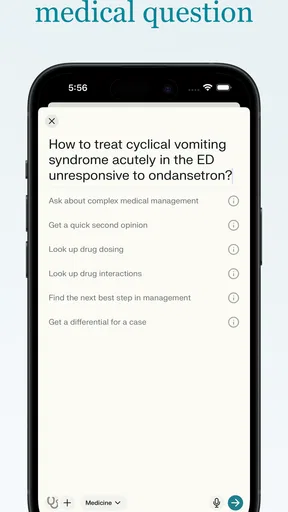
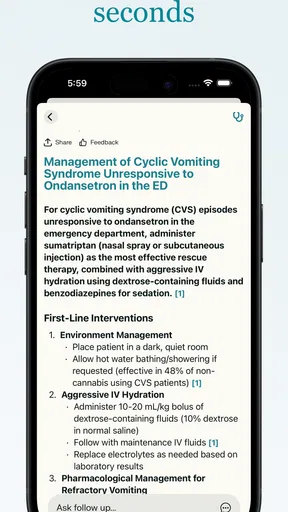
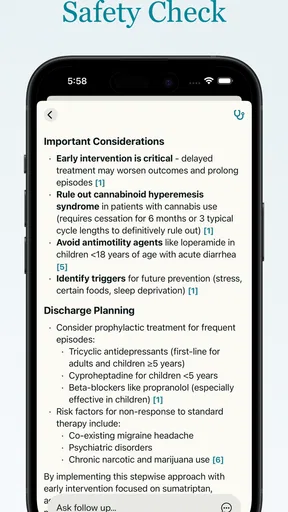
 Analysis by AppCompare
I’m interested in health apps when they make medical information easier to approach without pretending a phone can replace a clinician. Dr.Oracle AI Medical Assistant is built around asking questions about medical guidance and research, so its appeal is less about a polished wellness dashboard and more about having a place to explore health questions. My main test for an app like this is whether it helps me think clearly about what to ask next, while making its limits easy to keep in mind.
What I would use it for—and what I would not
For a non-urgent question, an AI medical assistant can be a useful starting point: I might use it to get oriented around a term I heard at an appointment, or to prepare a short list of questions before speaking with a doctor. That is different from asking it to diagnose me. A generated answer can help organize my thoughts, but it should not be the final word on a new symptom, a medication decision, or a worsening condition.
The best practical habit is to give the question context without turning the chat into a complete medical record. I would describe the issue, its timing, and the main concern, then ask what details a clinician would need to know. That can make a follow-up appointment more focused. I would avoid treating a confident-sounding answer as proof, especially if the guidance could affect urgent care or treatment.
Reading answers with the right level of trust
Medical language can be hard to parse, and a conversational format may feel more approachable than searching through dense research pages. Still, a readable reply is not automatically a reliable or complete one. I would look for whether an answer explains uncertainty, distinguishes general information from personal advice, and makes clear when a professional assessment matters. If it does not, I would ask a more cautious follow-up or take the question to a qualified clinician.
There is also a useful distinction between learning about research and applying it to one person. Studies often focus on particular groups and conditions; their conclusions may not fit someone’s history, age, other medicines, or circumstances. I would use the app to understand unfamiliar terms and frame better questions, not to decide on my own that a research finding changes my care.
How it fits beside familiar medical resources
Compared with a standard web search, a chat interface can make it easier to ask a follow-up in plain language instead of opening a string of pages. Compared with a health service that connects patients to clinicians, an AI conversation is a different kind of support: it can help explore a question, but it is not the same as having a person assess your individual situation. For a diagnosis, examination, or treatment plan, a clinician remains the better choice.
I would also keep the app separate from the official instructions that come with a prescription or a care plan. If advice from a chat conflicts with what a clinician has told me, I would not try to resolve that conflict by guessing which answer sounds more convincing. I would contact the care team or pharmacist. That simple boundary makes an AI tool more useful, because it gives it a supporting role rather than asking it to take over decisions it cannot safely own.
Worth Reading Before You Choose

EA SPORTS FC Mobile 26 Is a Bigger Football Game, but It Takes Time

Flipboard Shows What News Apps Must Do Beyond the Feed

Switching to Android Auto Means Rethinking Your Driving Routine

Google Calendar Makes a Crowded Week Easier to Manage

Ludo King Makes the Most of the Minutes Between Plans

Baby Panda World Brings Quick Play to Modern Phones, but Its Game Library Feels Busy
Getting Started with Dr.Oracle
The first thing I did was download the app, which is available for both Android and iOS. The installation was pretty straightforward, and within minutes, I was ready to dive into the world of digital health assistance. The registration process was simple and didn’t require too much personal information, which I appreciated.
Once you're in, you're greeted with a clean and intuitive interface. It’s surprisingly user-friendly, even for someone who isn’t tech-savvy. The main menu offers various features such as symptom checker, virtual consultations, and health records.
Diving into Features
Let’s talk about the symptom checker first. You input your symptoms, and the app uses its AI capabilities to provide potential causes and recommendations. I tried inputting a common cold symptom, and it gave me a list of possible conditions along with advice on whether to seek medical attention.
The virtual consultation feature is where things get really interesting. You can connect with a licensed medical professional directly through the app. I found this feature to be invaluable, especially for those quick questions that don’t necessarily warrant a trip to the doctor’s office.
Another cool feature is the health records section. You can store your medical history, prescriptions, and even track your vitals over time. It’s like having a mini health diary with you at all times.
Day-to-Day Usage
Using Dr.Oracle AI Medical Assistant daily is a breeze. The app sends you reminders for medications and appointments, which is fantastic for someone like me who tends to forget these things. It also offers health tips and articles that are actually quite informative and relevant.
A realistic use for the records and reminders is preparing for a routine appointment. I could keep a note of what I have been taking, use a reminder to stay on schedule, and bring a concise record of questions to the conversation. The advantage is not that the app makes the appointment unnecessary; it is that I arrive better prepared. I would still check stored details for accuracy rather than assume a health diary has captured every change correctly.
One of the standout features is the emergency button, which allows you to quickly access emergency services or contact a loved one. It’s a thoughtful addition that adds a layer of security, especially for those with chronic health conditions.
For a time-sensitive emergency, I would use the fastest dependable route to local emergency help rather than spend time describing symptoms to an AI. The emergency button may be a convenient shortcut, but I would not make it my only plan: users should know how they can reach emergency services and a trusted contact without relying on a particular app being ready. That distinction matters most when someone is distressed, has limited time, or is helping another person.
Readability and navigation in everyday use
A clear menu and familiar wording can lower the effort required to find a feature, particularly for someone who does not use health technology often. In my experience, the most helpful way to approach the interface is to decide what I need before opening it: am I looking for general information, trying to record something, or preparing to speak with a professional? Keeping one purpose in mind makes a feature-rich medical app feel less like a maze and helps me avoid treating every tool as equally relevant.
Medical content can still be demanding even when the controls are straightforward. If an answer uses a term I do not recognize, I would ask for a plain-language explanation and then check that I have understood the practical point, rather than relying on a quick skim. When reviewing an answer with a family member, I would focus on one question at a time and keep the original question visible in the conversation so the discussion does not drift into unrelated worries.
Motor, sensory, and shared-use considerations
Chat-based interaction can suit people who prefer typing a question over navigating a long list of medical topics. It can also create friction for someone who finds small touch controls, sustained screen use, or typing difficult. I would not assume that a conversational interface automatically solves those barriers. A caregiver or trusted companion may help someone formulate a question or review information, but the person receiving care should remain involved in decisions whenever possible.
For readers with visual or hearing needs, the practical test is whether the text and controls are comfortable on their own device and whether the information can be understood without depending on a format that does not work for them. I would try a low-stakes task first, such as looking up a general term, before relying on the app during a stressful moment. If reading a long explanation is tiring, asking for a concise summary and then checking important details with a professional is a sensible compromise.
Privacy and Security
In today’s digital age, privacy is a big concern, especially when it comes to health information. I was pleased to find that the app uses advanced encryption to protect user data. They have a clear privacy policy, and it seems like they’re serious about keeping your information safe.
Still, it’s always good to remember not to input overly sensitive information unless necessary. The app does a good job of balancing between providing helpful features and maintaining user privacy.
That caution is especially useful when using a medical chat: I would share only the details needed to make a question understandable, and leave out identifying information that does not help answer it. If I were helping another person, I would ask before entering their health details. The convenience of having information in one place is valuable, but it also makes careful, deliberate use more important.
Who is likely to get the most from it?
I can see this app fitting people who want a low-pressure way to explore medical topics, organize everyday health questions, or keep useful information close between appointments. It may be particularly helpful for someone who tends to forget what they wanted to ask once they are in a consultation. Writing questions down as they occur, then reviewing them before a visit, is a more grounded use than expecting an AI conversation to settle a diagnosis.
It is less suitable as a stand-in for clinical care, or for someone who needs immediate reassurance about a serious or rapidly changing symptom. It may also frustrate people who want a definite answer where medicine depends on examination, personal history, or tests. In those cases, contacting a doctor, pharmacist, or emergency service is the more appropriate next step, even if the app is easier to open.
Cost, fit, and the remaining trade-offs
The app is free to install, with optional in-app purchases that range from $5.99 to $239.99 per item. I would explore the free experience first and decide whether the way I actually use it justifies any paid option before spending. The developer is TheDeep, and the current version is 2.0.4; it is rated for Everyone and supports devices running Android 7.0 or later. Those details make it easier to judge basic fit, but they do not change the central question: does the app help with a real task without encouraging me to over-rely on it?
Its 4.2 average from around 350 ratings, alongside more than 50,000 installs, suggests that people have found a reason to try it, though popularity alone cannot tell me whether its answers suit my needs. I would treat the app as a practical companion for preparation and general learning, not as a promise of a particular medical outcome. If I needed clinician-led care as the main feature, I would choose a service built around direct professional support instead of relying on an AI assistant.
Final Thoughts
So, is Dr.Oracle AI Medical Assistant worth downloading? I’d say absolutely, especially if you’re someone who likes having quick access to medical advice and information. While it doesn’t replace the need for traditional medical care, it certainly complements it by providing a handy tool for everyday health management.
Overall, this app stands out for its ease of use, comprehensive features, and commitment to user privacy. Whether you're tech-savvy or not, you'll likely find it a valuable addition to your smartphone.
Pros
- Highly accurate diagnosis predictions.
- Easy to navigate user interface.
- Real-time symptom tracking.
- Integrates well with fitness apps.
- Provides personalized health tips.
Cons
- Requires internet for full functionality.
- Limited to English language support.
- Some features behind a paywall.
- Occasional delays in symptom analysis.
- Not suitable for emergency situations.
FAQs for Dr.Oracle AI Medical Assistant
What is Dr.Oracle AI Medical Assistant?
Dr.Oracle AI Medical Assistant is a groundbreaking app designed to provide users with personalized health insights and support. By leveraging artificial intelligence, it offers real-time analysis and advice on a wide range of medical concerns. Users can input symptoms, receive potential diagnoses, and access information on treatments instantly.
How accurate is the medical advice provided by Dr.Oracle?
While Dr.Oracle AI Medical Assistant uses advanced algorithms and a vast database to offer potential diagnoses, it is important to remember that it is not a replacement for professional medical advice. The app should be used as a supplementary tool, and users are encouraged to consult with a healthcare professional for accurate diagnosis and treatment.
Is Dr.Oracle AI Medical Assistant user-friendly for all ages?
Yes, Dr.Oracle AI Medical Assistant is designed with a user-friendly interface that caters to all age groups. It includes simple navigation, easy-to-understand language, and visual aids that help users of all ages access the information they need with ease. However, younger users may require supervision from adults.
Does Dr.Oracle require personal data, and how is privacy handled?
Dr.Oracle AI Medical Assistant prioritizes user privacy and security. While the app may require some personal and health-related data to provide accurate insights, it adheres to strict data protection protocols. Users' data is encrypted and stored securely, and the app complies with all relevant privacy laws and regulations.
Is Dr.Oracle AI Medical Assistant free to use?
Dr.Oracle offers both a free version with essential features and a premium subscription model. The free version provides basic functionalities, while the premium version unlocks advanced features such as personalized health tracking and expanded medical insights. Users can choose based on their needs and preferences.


